
Bridal shower games · made personal
A bridal shower game with her story in every card.
Her primas know the childhood stories. Her friends know the voice notes. Her future family is just getting to know her. Bring all those versions of her to the same table.
Leer esta guía en españolSomewhere between “¿qué llevamos?” and the fifth message about the colors, you became the person organizing the games. You want this bridal shower to feel like her, not like a list of activities everyone has to get through. And you would like to sit down and enjoy it, too.
Picture this: someone calls “El Cafecito.” Her best friend immediately knows which order the card means. Her future suegra asks for the story. A prima adds the part everyone forgot. Spanish, English, a little of both. Suddenly the people who arrived knowing different chapters of her life have something to share.
That is the idea behind a personalized bridal shower Lotería. Not every Latino family grew up playing, and not every guest will know the rules. The pictures offer a place to start. The memories make this version hers.
Next step
Make the game only her people could make.
Start with the photo that makes you think, “That is so her.” Build and preview first, then choose your Maker Pass when you are ready.
Product preview
A ready-made alternative
Choose a game for the people, not just the theme
For a quieter brunch, a seated picture game can fit between food and gifts. For friends who love telling stories, invite the caller to share a short memory with a few cards. For a mixed English-and-Spanish group, use both languages in the labels and show each picture as you call it.
Keep participation optional. Avoid embarrassing photos, private messages, or jokes the bride would not want shared with this group. Ask her or someone she trusts before including a sensitive memory.
- A custom Lotería: photos, nicknames, and shared memories.
- A memory card station: guests write a favorite moment for the bride to keep.
- Advice cards: a relaxed activity guests can finish at their own pace.
- Gift-opening bingo: a different game, where guests mark gifts as they are opened.
Turn her story into a bridal shower Lotería
Start with clear photos and short names. Mix people, places, and little rituals. Create your own cards or open Y&L’s Bridal Shower theme below My projects in Studio and replace a few cards.
Maker supports up to 100 cards and 3 × 3, 4 × 4, or 5 × 5 grids. Up to 50 boards with a new pass; up to 100 for custom projects with an active membership or according to an older pass’s benefits. A pass covers one project and three final saves within its shown 30-day editing window. Saving or replacing uses one; mixing and repeat downloads use none. The last save locks editing and only the current saved final set is retained.
- The Bride / La Novia: a photo she loves.
- The First Date / La Primera Cita: the place their story began.
- The Proposal / La Propuesta: the moment or a meaningful detail.
- The Coffee Order / El Cafecito: her everyday ritual.
- The Besties / Las Amigas: a group photo with permission.
- The Dance Floor / La Pista: a favorite party memory.
How to play, without a long explanation
Give each guest or team a board and markers. Choose the winning pattern before you begin, such as one horizontal row. Shuffle the matching calling deck, draw one card at a time, say its name, and show the image. Guests mark matching pictures. When someone calls “¡Lotería!”, check their marked pattern against the cards drawn.
For bilingual play, use the same Spanish-then-English rhythm every time. Demonstrate one turn first and let people share a board if that is more comfortable. This version is played by drawing cards, not by waiting for registry gifts to be opened.
A simple bridal shower game plan
Use this flexible plan as a starting point, not a promised game duration. Leave room for conversation, food, and the bride’s preferred pace.
- Before the day: review names and photos, save the final files, and print one test sheet.
- As guests arrive: set out memory or advice cards and make introductions.
- After food: explain Lotería, show the winning pattern, and play a practice turn.
- During the game: pause for a few stories, keep the rest of the calls moving, and have a tie rule.
- After the game: give a small prize, gather the memories, and keep the deck for the bride.
Make the game part of a thoughtful gift
A custom deck can become a keepsake when the party is over. Pair it with a handwritten note explaining why you chose those people and memories. If you are a bridesmaid, preparing the activity can also be your contribution to the shower; check with the host so you do not duplicate plans.
For game prizes, choose something modest and useful: a café gift card, a small plant, or a locally made treat with ingredients labeled. Keep prizes separate from the bridal gift and make sure nobody needs to buy anything to participate.
Personalized, printable, or already printed?
Choose Maker to use your own photos and memories or customize a theme. Each account can save a fixed starter of up to five boards from one own-photo project; it excludes the printable card deck and tokens. Complete files and theme downloads require a pass or active membership. Printing and AI are separate purchases.
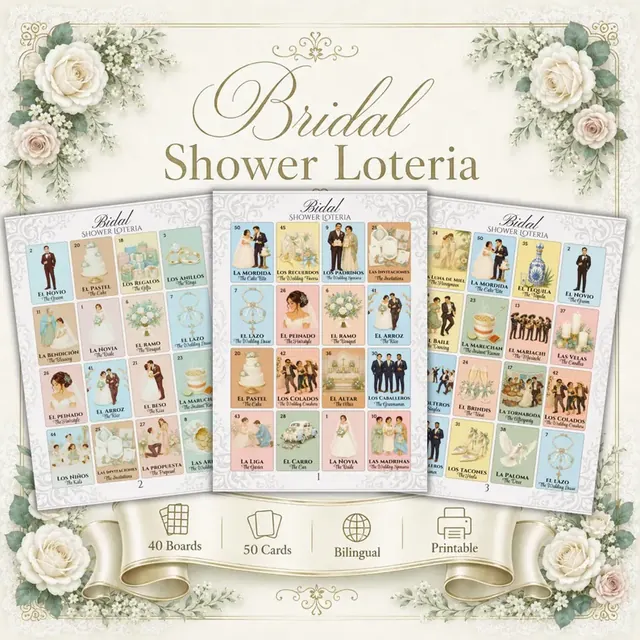
To focus on hosting, shop the ready-made Bridal Shower Lotería, with 50 bilingual cards and 40 boards in its digital edition. Its files and price are separate from a customized project. Check current physical-set options if you prefer it already printed.